How to work with wildcard * in the order filter
Key features
- Use the
*wildcard to match any combination of characters in the order filter - Catch groups of orders by partial values, such as a carrier or an email domain
- Available in all filter fields except Payment, Max Sum, and Max orders
Quick guide
- Open the order filter.
- In a supported field, enter a value using the
*wildcard (for example*DHL*or*@mail.com). - Matching new orders are locked and moved to the Pending - Filter list for review.
The order filter automatically sorts and locks new orders, moving them to the Pending - Filter list for manual review. This helps you identify specific types of orders based on criteria you set, such as orders made with a specific email, above a maximum sum, or with a specific carrier.
The * symbol, known as a wildcard, matches any combination of characters, making it a flexible filtering tool. You can use * in all fields except Payment, Max Sum, and Max orders.
Examples
Filter all orders from a specific carrier
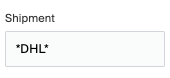
Adding the value *DHL* filters all orders created with any DHL option set as carrier, no matter which DHL shipping option the customer chose (service point, package, and so on).
Filter all orders from a specific email domain
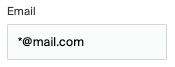
Adding *@mail.com in the Email field filters all orders where the customer's email contains the domain @mail.com (person1@mail.com, person2@mail.com, and so on).
Find an order in Merchant Center
Quickly find and manage an order in Merchant Center.
Managing an order that contains product that's out of stock (Oversellable)
When you work with overselling (oversellable stock), a product with an oversellable balance stays available for sale even when its normal inventory balance is 0.