Deliver a single order
Key features
- Deliver a single order at a time
- Download the pick list and shipping documents for the order
- Complete the delivery to charge the customer and send the confirmation email
Quick guide
- Open the order to be delivered and click Fulfill order.
- Once the order is processed, download the pick list with Item list and the shipping documents with Documents.
- Print the documents, pack the order, and attach the label and delivery note.
- Click Deliver to complete the delivery.
To print labels you need a laser printer with a full duplex module and the correct printing paper. The shipping label layout is based on a three-part, double-sided label paper.
Deliver a single order
Open the order to be delivered (see how to find an order). To start a delivery, click Fulfill order.

The delivery starts and you enter the delivery view (Fulfillment status). Started deliveries are always available under Fulfillment History in the menu.
If you leave the delivery and want to return to it, open the order and click the parcel group number in the Fulfillment history box.

Once the order has been processed with no obstacles, all the documents are available to complete the delivery.
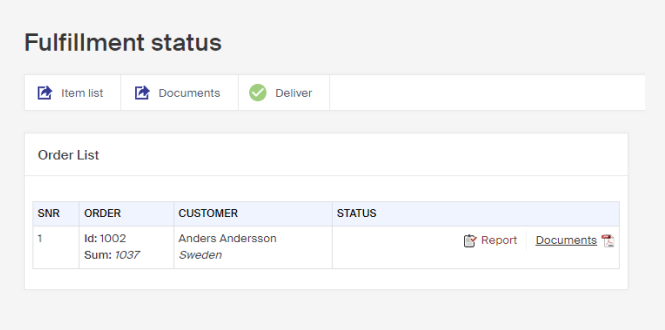
Download the pick list by clicking Item list.
Download the shipping documents by clicking Documents. They contain the shipping label and delivery note, and can also include the return label and return slip, depending on how the document is configured.
For a single order, you can use either the Documents button in the top bar or the one beside the order in the list, both contain the same thing. For a batch of many orders, the button in the top bar contains the shipping documents for every order.
Print the downloaded PDF, then complete the package by attaching the label and adding the delivery note.
When the package is ready, complete the delivery by clicking Deliver. The money is then charged from the customer and an order confirmation email is sent automatically, letting them know the order is on its way.

The delivery is now made and the package is ready to be sent to the customer.
Return document to customer
There are two ways to configure how a customer gets their return documents: sent directly with the order on delivery, or sent on demand when the customer contacts you, by post or email.
Deliver orders in a batch
Deliver many orders at once in a single batch, selecting which orders to include and downloading shared documents for them.