Remove individual orders from a delivery
Key features
- Remove a single order from an ongoing delivery using the Report function
- Choose Report (item missing) or Report as suspect depending on the reason
- Removed orders lock automatically and land under Pending - Locked
Quick guide
- On the order's row in the delivery, click Report.
- Choose Report order as suspect or Report on the product.
- The order is removed from the delivery, locks automatically, and lands under Pending - Locked.
There are different reasons to remove an order from a delivery. If the customer regrets their choice, use the report function, then open the order, tick Lock permanently, and save to cancel it. Another case is inventory variances, after reporting, open the order, unlock it, make the needed changes, and deliver it again.
Remove an individual order from a delivery
To remove an order from a delivery, click Report on the order's row.
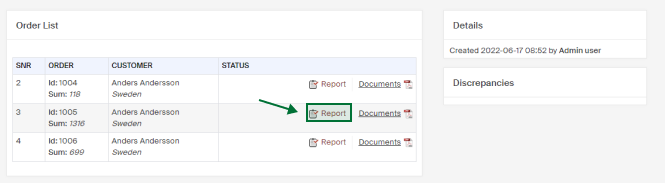
You can remove the order by clicking either Report order as suspect or Report on the current product.
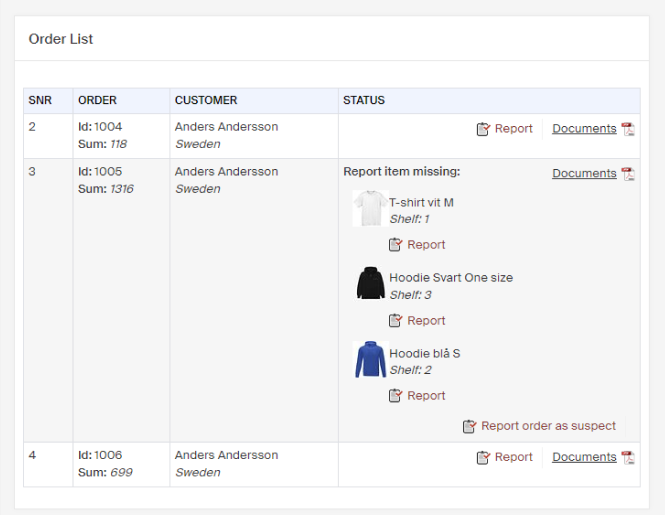
Both buttons remove the entire order from the delivery, but give different messages to clarify:
- Report , clicking Report on a product removes the entire order, and you get the message Item missing under Discrepancies.
- Report as suspect , the order is removed and you get the message Reported as suspect under Discrepancies, so you can take it for further investigation.
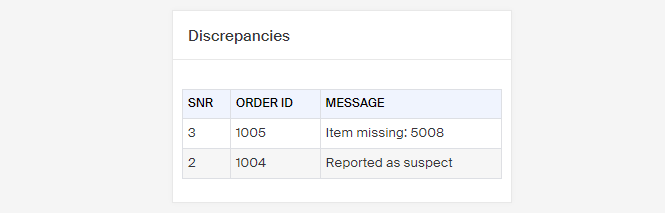
If you report an order and remove it from the delivery, it locks automatically and lands under Pending - Locked.
Handle locked orders
When an order gets locked it could be for several reasons. Perhaps the payment method failed or some postal information is inaccurate. These orders are flagged in Geins Warehouse (WMS) as Pending - Locked.
Order refunds
Once a returned item has been received, you can refund your customers.