Create Content
Create and edit the start page
Create and enrich start pages with content under Content (CMS) in Merchant Center.
Key features
- Create and edit start pages, with support for multiple start pages
- Build the layout with block templates and widgets
- Add as many blocks as you want
Quick guide
- Go to Content (CMS) > Start Page.
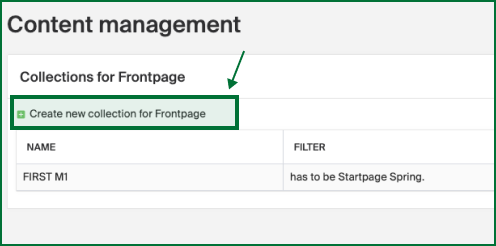
- Click Create new collection for Frontpage.
- Drag block templates onto the page and add widgets.
- Click Save and publish.
Go to Content (CMS) in the left menu and click Start Page.
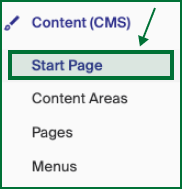
You see a list of all your front pages. Edit an existing one, or click Create new collection for Frontpage in the upper left corner.
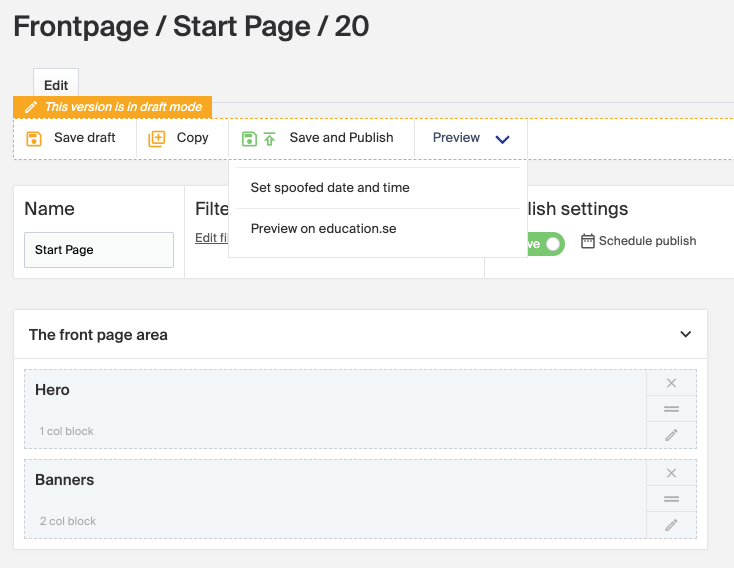
Build the layout with block templates. See Block templates for the available layouts. To add one, drag and drop it onto the content area. You can add as many blocks as you want. In the example below there are two blocks: the first, titled Hero, is a 1 column block, and the second, titled Banners, is a 2 column block.
For block settings such as name, mobile behavior, display, and design, see Content Blocks settings options. To plan when content goes live, see Scheduling content.
Once the content for the front page is set up, click Save and publish.