General Settings For Content Management
Scheduling Content
Plan the publication of your content, and preview how it will appear on the scheduled date and time.
Key features
- Schedule when a whole page or individual blocks go live
- Set both a start and a stop date and time for availability
- Preview content as it will appear at a scheduled date and time
| Feature | Description |
|---|---|
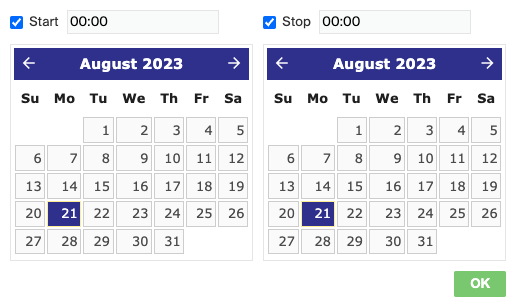
| Schedule page and block publication | Use the Schedule Publish button to set precise dates and times for the whole page, or individual blocks within it, to become publicly accessible. Content goes live automatically on your schedule. |
| Setting start and stop times | Set both a start date and time and a stop date and time for the content's availability. Useful for time-sensitive information, or to limit visibility of certain content after a timeframe. |
| Previewing scheduled content | The scheduling tool offers a spoofed preview, letting you visualize the page at the scheduled date and time before it goes live, so you can make any adjustments first. |
Filter settings for Content
Filter your content depending on the type of content area you are working on, to show the right content in the right place.
Preview/View your content
Preview and view your content in Geins CMS, whether it's live, scheduled, or in draft form. You can work with drafts in all sections except Menus.