Create Content
Working with drafts
Create drafts in Geins CMS to develop content without publishing it live on your webshop.
Key features
- Create drafts to develop content without publishing it live
- Create a draft from scratch or from an existing page
- Preview changes, including at a spoofed future date and time
- Publish and delete, or publish and convert the live version to a draft
Quick guide
- On a live page, click Create Draft > Create Draft for this Collection.
- Make your changes.
- Use Preview (and Set Spoofed Date and Time) to check.
- Click Save and Publish and choose Publish and Delete or Publish and Convert.
The draft feature lets you work on content in advance, preview changes, and ensure everything looks right before going live. Drafts can be created from scratch or from an existing page.
Example: updating the start page
To update your start page but preview the changes first:
- Go to your live start page and click Create Draft > Create Draft for this Collection.
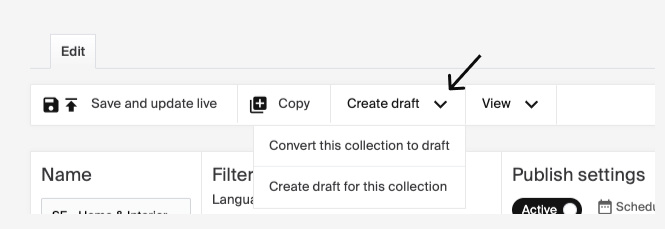
- You now have a draft identical to your live page. Make the changes you want.
- Use the Preview button to see how your changes will appear. If you have content with specific publication dates and times, use Set Spoofed Date and Time to preview how the page will look at that exact time.
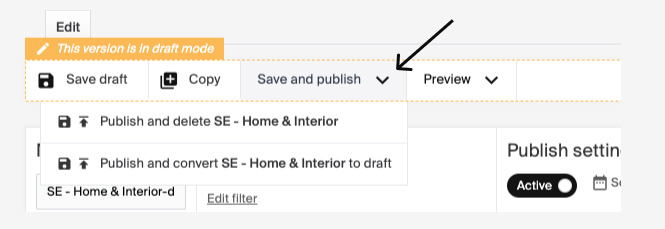
- When you're ready to go live, click Save and Publish. You have two options:
| Option | Description |
|---|---|
| Publish and Delete | Publishes the draft and deletes the current live version. |
| Publish and Convert | Publishes the draft and converts the live version into a new draft. |
The preview function depends on it being implemented in your storefront.