Import Templates
Import Tool URLHistory Template
Redirect old URLs from a previous webshop to your existing shop using the import tool. The redirect uses status code 301.
Key features
- Redirect old URLs to your existing shop via import
- Redirects use status code 301
- Useful for managing redirects during a migration project
Quick guide
- Go to the Import Tool in the menu and click New.
- In the Template type dropdown, select URLHistory.
- Click Download file template.
After launching your webshop, some URLs often still point to your previous webshop. Use the import tool to redirect them to your existing shop. The redirect uses status code 301.
Download the import template by going to the Import Tool in the menu, clicking New, choosing URLHistory in the Template type dropdown, and clicking Download file template.
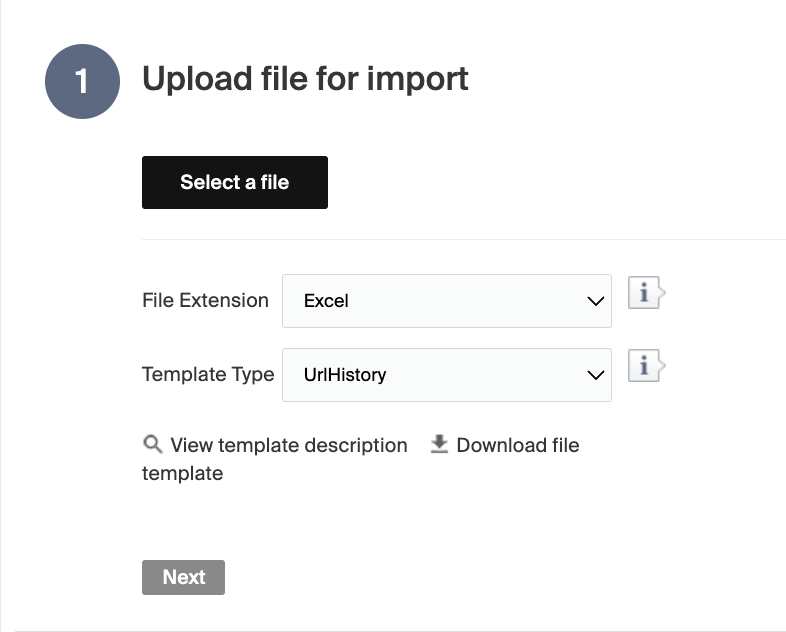
A description of the columns follows. There is also a short description in Merchant Center under View template description.
| Column | Description |
|---|---|
| OldUrl | The old URL. |
| NewUrl | The new URL. |
| SiteId | The site ID the URL belongs to. |
| Extra Info | Any extra information you want to add. |
This template can be used to manage any 301 redirects that arise during a migration project.