Import Templates
Import template for related products
Create relations between products with the import template. Requires existing relation types configured.
Key features
- Create relations between products via import
- Relate products by the related columns or a comma-separated list
- Remove relations with the Remove column
Quick guide
- Go to the Import Tool in the menu and click New.
- In the Template Type dropdown, select RelatedProducts.
- Click Download File Template.
This requires that you have existing relation types configured. Use the template to add relations, then upload your file to apply the changes.
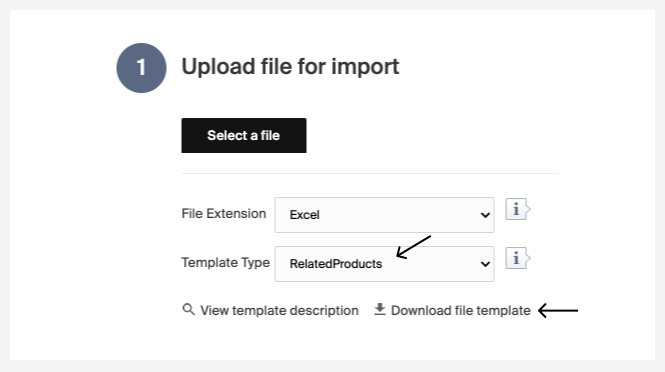
A description of the columns follows. There is also a short description in Merchant Center under View template description.
| Column | Description |
|---|---|
| ProductId | Id of the product. |
| ProductName | Name of the product. Used to find the first matching product Id if Id is not specified (use Id for performance). |
| Type | Name of the relation type. Must match an existing relation type. |
| Related1 to Related6 | Product Id of a product to relate. |
| RelatedCSV | Additional relations as comma-separated product Ids, with no quantity limit. Can also be used on its own instead of the Related1 to Related6 columns. |
| Remove | If value Remove is added: without Ids in any related column, all related products for the specified relation type are removed from the product; with Ids in any related column, only the specified products are removed from the relation. |