Import Templates
Import template for pictures
Import product pictures to existing products via the import tool. The pictures must be available via a URL.
Key features
- Import product pictures to existing products via URL
- Control the order of pictures, including which becomes the main picture
Quick guide
- Go to the Import Tool in the menu and click New.
- In the Template Type dropdown, select Product Images.
- Click Download file template.
This requires that the pictures you want to import are available via a URL.
Download the import template by going to the Import Tool in the menu, clicking New, choosing Product Images in the Template Type dropdown, and clicking Download file template.
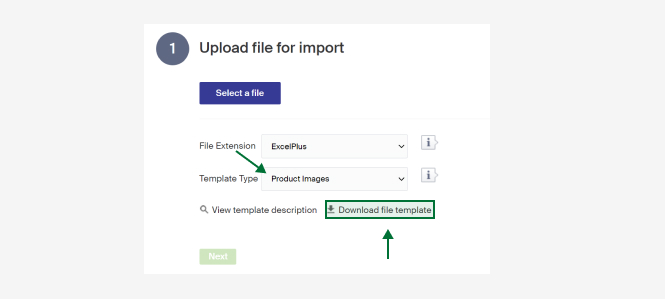
A description of the columns follows. There is also a short description in Merchant Center under View template description.
| Column | Description |
|---|---|
| Id | Id of the product to import the pictures to. |
| Name | The product's name. Mandatory if the Id is not filled in. Can be left empty if the Id is there. |
| ImageUrl | Link to the picture to import. The complete URL must be included. |
| ImageOrder | Placement order of pictures. 0 or blank = the picture is added last. 1 = the picture becomes the main picture, shown in product listings. >1 = the picture is ordered with the supplied value. If other pictures already exist at the supplied order value, those pictures and any after them are bumped up one step. |
Import template for GoogleTaxonomy
Match your categories to Google Taxonomy, the categories Google uses to distribute products in a shopping flow.
Import template for product parameters
Apply parameters and parameter values to products via the import tool. Requires that parameter groups and their parameters are created first.