Import Templates
Import template for products
Create or update products with the product import template, downloaded from the Import tool.
Key features
- Create or update products via import
- Set prices, currencies, texts, categories, and meta fields
- Manage stock and size/model (item) level fields
- Set markets, dimensions, supplier, and classification
Quick guide
- Go to the Import Tool in the menu and click New.
- In the Template type dropdown, select Product.
- Click Download file template.
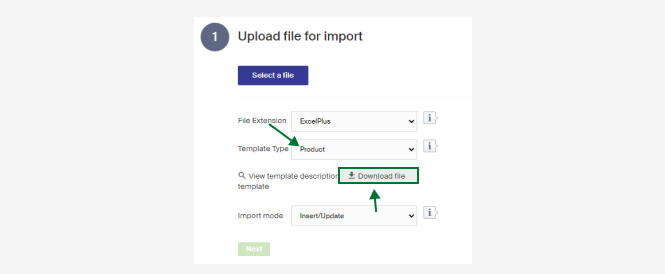
A description of the columns follows. There is also a short description in Merchant Center under View template description.
| Column | Description |
|---|---|
| Id | The product's Id in Merchant Center. |
| Name | The product's name. Can be left empty if the Id is present, but must be filled in if the Id column is empty. |
| Article number | Article number, applies to the Article Number (SKU) field on the product view. |
| Price | The product's price (in the default currency if the Currency column is missing). |
| SalePrice | The product's sale price (in the default currency if the Currency column is missing). |
| Currency | The currency of the price to add or update in the Price or SalePrice column. Use the three-letter abbreviation, for example SEK. |
| InPrice | The product's purchase price. |
| InPriceCurrency | Currency for the purchase price (three-letter abbreviation). Default price is set if left empty. |
| Text1 | Product text, field Text 1 on the product view. Where the text is used in the store depends on the store's design (earlier tech text). |
| Text 2 | Product text, field Text 2 on the product view. Where the text is used in the store depends on the store's design (earlier short text). |
| Text 3 | Product text, field Text 3 on the product view. Where the text is used in the store depends on the store's design (earlier long text). |
| Brand | The product's brand. The brand must be set up in Merchant Center. |
| Category | Main category. The product's URL breadcrumbs are based on the main category. A product must have one main category to be visible in the shop. |
| AdditionalCategory1 to AdditionalCategory3 | Additional categories. Lets you add products to more categories. They do not need to be sub-categories of the main category. |
| MetaTitle | Meta title for the product. |
| MetaDescription | Meta description for the product. |
| MetaKeywords | Meta keywords for the product. |
| Active | Whether the product is active. TRUE for active, FALSE for inactive. If left empty, set as active. |
| ExternalId | External Id, applies to the external id field on the product view. An additional identifier for matching by name: both name and External Id must then be unique. |
| Markets | Ids for the markets the product is sold in, as a comma-separated list (1,2,3,4 and so on). If left empty, the product is set as available on market Id 1 by default. |
| Weight | The product's weight. |
| Height | The product's height. |
| Width | The product's width. |
| Length | The product's length. |
| Size | Product name (size/model) on a product item. A new article is created if the name is not found or the product is new. A standard name is used if left unspecified. |
| OldSize | The product article's (size/model) old name. If provided, matching product articles have their name changed to the value in the Size column. |
| Stock | Inventory balance. Requires the Size, Name, and Id fields. |
| OversellableStock | Oversellable inventory balance. Requires the Size, Name, and Id fields. |
| StaticStock | Static inventory balance. Requires the Size, Name, and Id fields. |
| StockThreshold | The stock threshold. Requires the Size, Name, and Id fields. |
| SizeExternalId | External Id on size/model level. Requires the Size, Name, and Id fields. |
| SizeArticleNumber | Article number on size/model level. Requires the Size, Name, and Id fields. |
| Shelf | Shelf place. Requires the Size, Name, and Id fields. |
| GroupName | For product relations, the name of the relation type the product belongs to. |
| GroupKey | Identifier for a product relations group (any number). Products with the same number in the import become related products. |
| GS1EANNumber | GS1 number (EAN number) on size/model level. Requires the Size, Name, and Id fields. |
| ItemWeight | Weight on size/model level. Requires the Size, Name, and Id fields. |
| ItemHeight | Height on size/model level. Requires the Size, Name, and Id fields. |
| ItemWidth | Width on size/model level. Requires the Size, Name, and Id fields. |
| ItemLength | Length on size/model level. Requires the Size, Name, and Id fields. |
| MaxPercent | The maximum percentage discount a product should have (for example 70%). Applies to the Max Discount (%) field on the product view. |
| Supplier | Name of the supplier. |
| LanguageId | Language Id, used for translations. Fill in the Id for the language if you want to add translations on fields like Text1, Text2, and Text3. Leave empty for the default language. |
| IntrastatCode | Intrastat code. |
| CountryOfOrigin | The product's country of origin, either country name or country code. |
| ProductClassificationId | Id for the classification the product belongs to. |
| ProductGuideIds | Ids for the product guides the product belongs to (comma-separated list 1,2,3,4 and so on). |
| FreightClassName | Name of the freight class the product belongs to. Requires freight classes to be configured. |