Product Editing
Product stock options
How to add stock count to a product, and a description of the available stock options.
Key features
- Choose the right stock option for a product: In Stock, Oversellable, or Static Stock
- Add stock from the In Stock field in the product list
- Each option controls how availability and delivery time are shown
Quick guide
- Open the product and find the In Stock column in the product list.
- Make sure the product has at least one item, then enter the stock amount.
- Click Save.
When managing products for sale, choose the appropriate stock option for your inventory situation. There are three main options, each serving a specific purpose.
How to add stock
- Go to the product page and find the In Stock column in the product list.
- Make sure the product has at least one item, then enter the desired stock amount in the In Stock field.
- Click Save to update the stock.
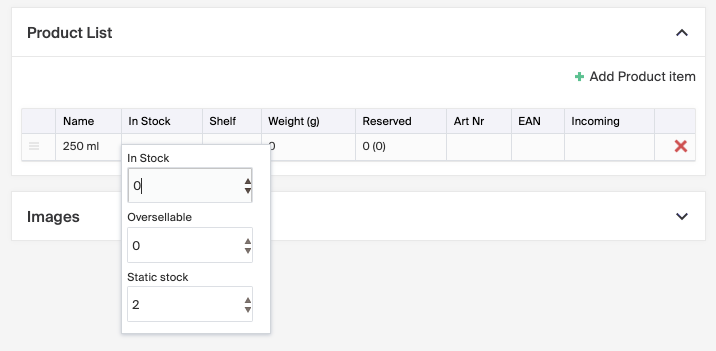
Stock options
In Stock
- Used when the product is physically available in your inventory.
- Enter the available quantity to display the product as "In Stock" on the storefront, so customers know it's ready for purchase and immediate delivery.
Oversellable
- Used when you want to sell a product even if it's not currently in stock.
- The product is still listed as "in stock" on the product page.
- Customers can buy it, but the delivery time automatically adjusts to the timeframe set for oversellable items. For example, if your standard delivery is 1-3 days, oversellable items might show 5-10 days. This keeps customers informed of potential delays before they order.
Static Stock
- Used for products that are produced on demand and always available for purchase. Enter "1" to keep the product consistently available and shown as "in stock".
- Static stock isn't counted down, but you can only buy as many as are in the field.
- The value is the maximum amount available per purchase. For example, if you set 4, customers can add up to 4 to the cart, but there's no limit on how many orders they can place.
- Particularly useful for items created upon order, so customers are aware of their immediate availability.
By using In Stock, Oversellable, or Static Stock, you can manage your inventory and meet customer expectations, whether products are physically on hand, oversold with adjusted delivery times, or produced on demand.