Product Editing
Manage products in your feeds
You manage products in the feeds you have configured on the product view.
Key features
- Add or remove a product from your configured feeds on the product view
- Include the product's discount price in a feed
- Changes apply when the feed syncs (most feeds update every hour)
Quick guide
- Open the product page in the PIM section.
- In the Feeds box, check the feeds to include the product in.
- To remove the product, uncheck the Active column for that feed.
- Click Save.
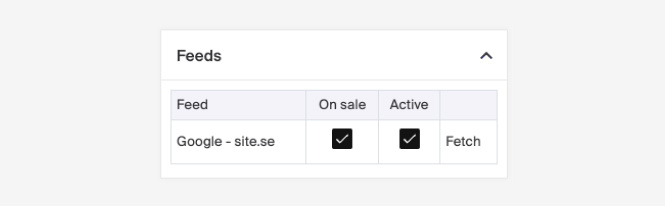
In the PIM section, on a product page, you'll find the Feeds box. It contains the feeds you've configured. Add the product to a feed by checking the boxes:
- On Sale , include the product's discount price in the feed.
- Active , include the product in the active feed.
- Fetch , download the active feed file.
Remove a product from a feed
- Go to the product page of the item you want to remove.
- In the Feeds box, uncheck the checkbox in the Active column for the feed you want to exclude the product from.
- Click Save to apply the changes.
Feeds sync
Changes, such as price updates or product removals, apply when the feed syncs. Most feeds update every hour, though timing may vary based on the feed's type or version.