Product Parameters
Apply parameter values on a product
How to enrich a product with information using parameters and filters.
Key features
- Enrich a product with information and characteristics using parameters
- Choose which parameter groups to apply to a product
- The available value type depends on the parameter's type
Quick guide
- Open the product and find the Parameters box.
- Click the parameter groups you want to enrich the product with.
- Fill in or choose the values, then click Save.
To enrich a product with information and characteristics using the parameters you've created:
- Open the product you want to fill with parameter information.
- On the product view, find the created parameter groups in the Parameters box.
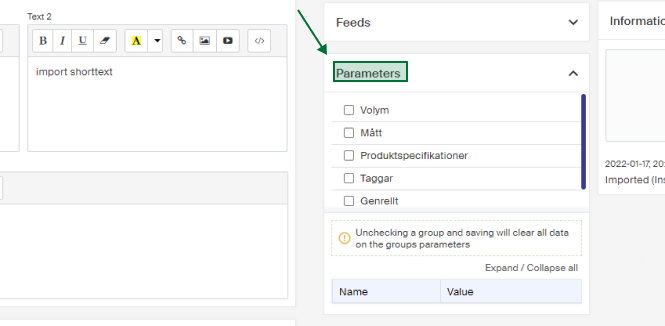
The upper part lists the created parameter groups. Click the groups you want to enrich with information and characteristics.
Below them you'll find the parameters the group or groups contain. In the value fields, fill in or choose the value you want the parameter to have for the product.
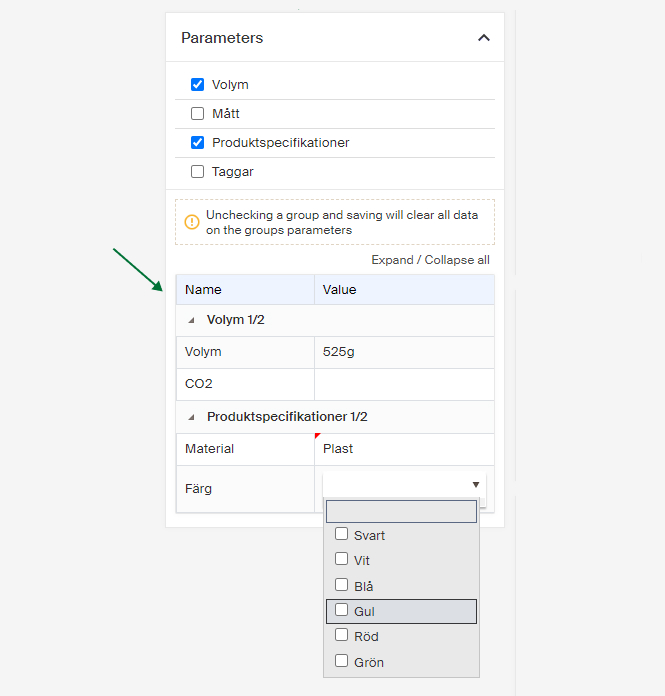
What you can fill in or choose depends on the parameter's type. This is controlled by the Type field when you create your parameters and parameter groups. See Create parameters and parameter groups for more about the types.
When you've filled in the information you want, click Save.