Add a new product
Key features
- Add and publish a new product in Merchant Center
- See what's required to publish in the Publication requirements box
- Enrich the product with categories, parameters, feeds, variants, and related products
Quick guide
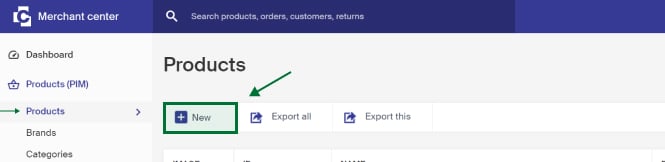
- Go to Products (PIM) > Products and click New.
- Fill in the product fields to enrich it with information.
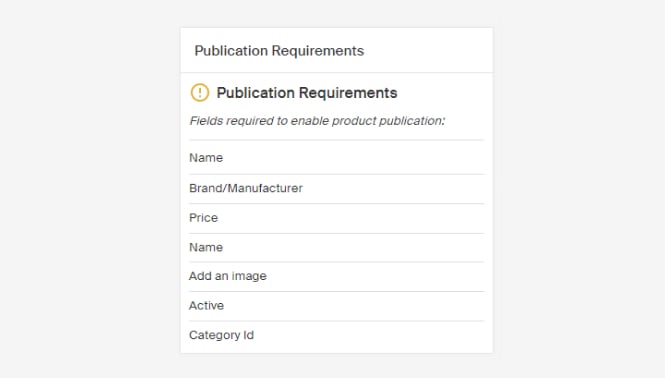
- Check the Publication requirements box to see what's still needed.
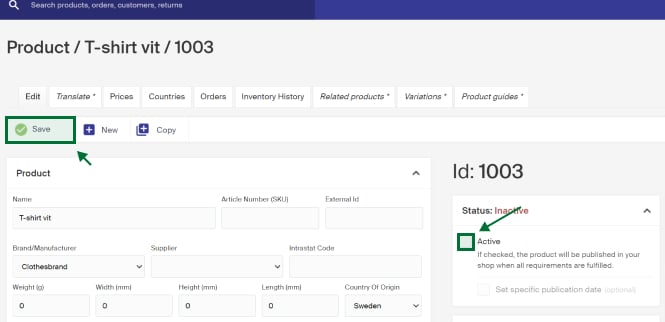
- Set the product to active and click Save.
To publish a product, you need a few things in place, including at least one category to assign the product to (see Create new category) and the appropriate trademarks.
Place a new product
Go to Products (PIM) > Products and click New.
Fill in the fields to enrich the product with information. See Description of fields on product view for what each field does.
The Publication requirements box shows what information needs to be in place for the product to go on sale in the store.
When the product has the information you want and you're ready to publish, set it to active and click Save. The product becomes visible in the store in a moment.
Further information and functions
Beyond the mandatory fields, there are other parts you can use to enrich your product. Some of the most common are below.
- Categories , place the product in the categories you want in the Product categories box. See Add products in a category.
- Product parameters , parameters let you specify information with values used for things like product specifications and filtering. On the product view you fill in the values for each parameter. See Create parameters and parameter groups.
- Feeds , to include the product in a configured feed, check it on the product view. See Manage products in your feeds.
- Publishing date , to publish a product live on a specific date, set a publishing date. See Placing publish date.
- Product variants , if the product exists in several variants, such as colors, you can connect them. See How to create a variant group.
- Related products , connect products together, for example to show relevant accessories on the product page. See Related products.
What does it mean to blacklist a product?
When a product is blacklisted, it's not available for sale or distribution in the targeted market, and efforts are made to prevent its sale through your store.
Description of fields on product view
Description of the different parts and fields in the product view in Merchant Center.