Other Product Functionality
What does it mean to blacklist a product?
When a product is blacklisted, it's not available for sale or distribution in the targeted market, and efforts are made to prevent its sale through your store.
Key features
- Restrict a product from being sold in a specific market
- Blacklisting excludes the product from the chosen country but keeps it visible in other markets
Quick guide
- Go to Product (PIM) and open the product.
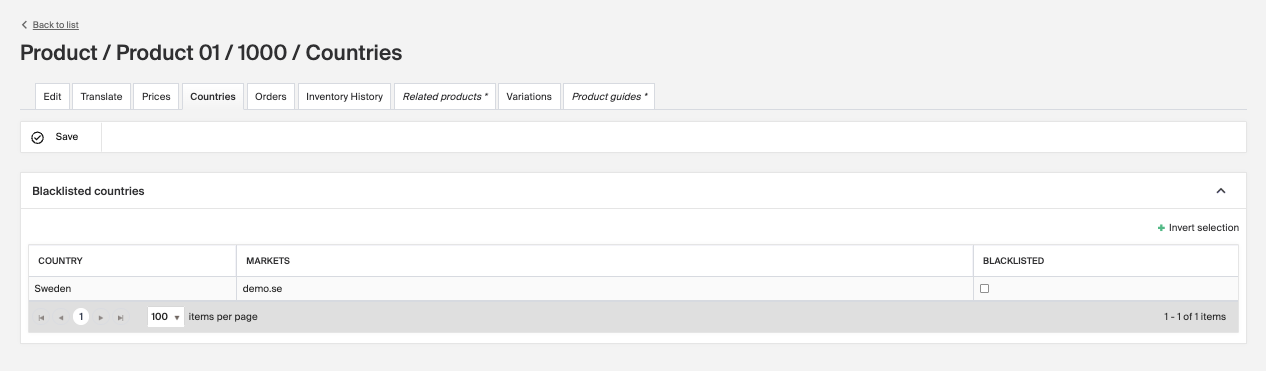
- Open the Countries tab.
- Check the country to blacklist the product for, then click Save.
Blacklisting a product for a certain market means deliberately restricting or prohibiting its sale and distribution in a specific market segment. This can happen for several reasons:
- Legal and regulatory compliance , some products are illegal or require specific licenses in certain countries or regions. A product that's legal in one country might be banned in another due to local safety, health, or morality laws.
- Cultural sensitivity , products that are offensive or culturally insensitive to certain groups or regions are often blacklisted to avoid offending customers or violating social norms.
- Brand strategy , a company may restrict certain products in specific markets to align with its brand strategy, such as maintaining a luxury image or targeting a specific demographic.
- Economic sanctions , sanctions imposed by governments or international bodies may require halting sales of certain products to specific countries or regions.
- Risk management , companies might blacklist products in markets with a high risk of fraud or intellectual property theft, or where legal systems make it hard to enforce contracts and protect rights.
Blacklist a product
- Go to Product (PIM) and click the product you want to blacklist for a certain market.
- Open the Countries tab.
- Check the box next to the country you want the product blacklisted for, then click Save.
The product is now excluded from your chosen country but stays visible in your other markets.