How to add a new product with multiple sizes via the import tool
Key features
- Create a single new product with the Insert/Create New mode
- Create a product with multiple sizes with the Insert/Update mode
- The first row creates the product; subsequent rows add items (sizes)
Single product
Use the Insert/Create New import mode to create a single product. This mode creates new products where the ID does not exist, regardless of the name, and does not update existing products.
Product with multiple sizes
Use the Insert/Update import mode. This mode creates a product if no matching ID or Name exists, and updates an existing product if there is a match.
How it works:
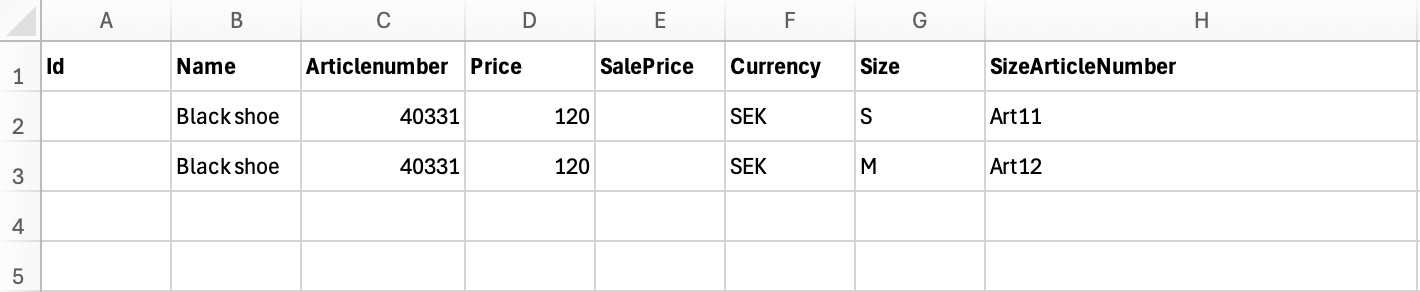
- The first row creates the product with its Name and assigns an ID.
- Subsequent rows match the Name from the first row to add additional product items (for example, sizes).
Example
The import file below creates a product named Black Shoe with an auto-generated ID and Article Number 40331. Two sizes (S and M) are added, each with its own unique article number.
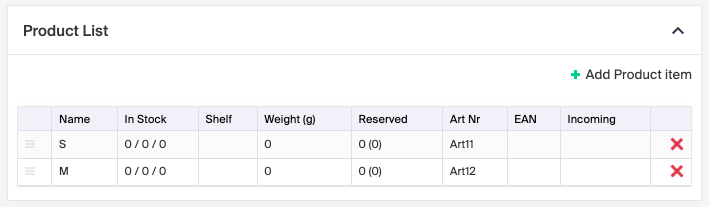
The product view in Merchant Center after the import:
How the import tool works
The import tool lets you create or update different parts in a batch. Several complete import templates are available to start from.
How to handle 404 pages via the Import tool
Redirect 404 pages to the correct URLs using the import tool, important for SEO and reducing bounce rates.