Customer Management
Merge customer accounts
When a customer has multiple accounts, use the merge function to combine them into one.
Key features
- Combine two customer accounts into one in the Customers (CRM) area
- Orders transfer to the active account (can take up to two minutes to show in the orders list)
- The merged account is set to inactive but remains in the system
Quick guide
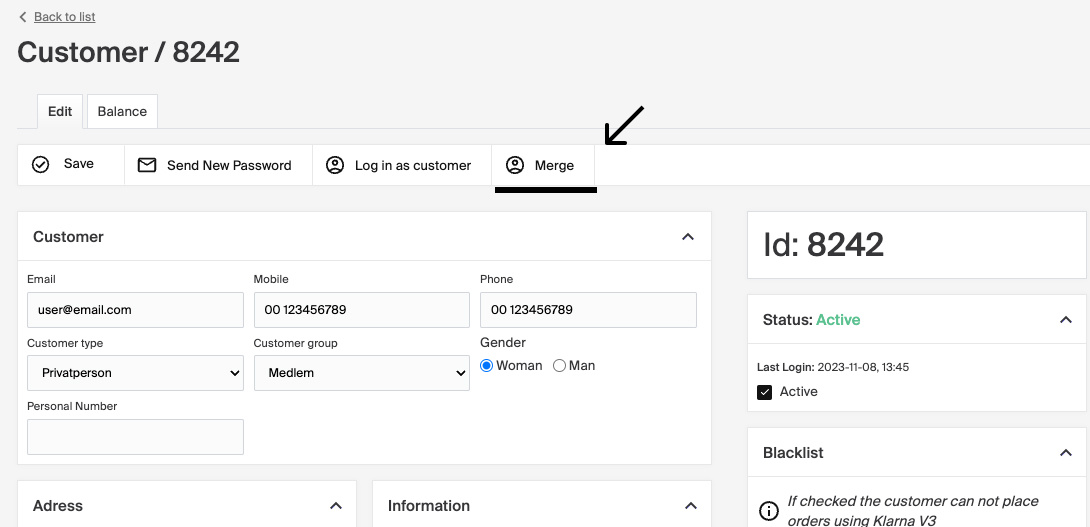
- Go to the customer account you want to merge.
- Click Merge.
- Enter the ID of the account you want to merge with.
- Select the correct account and click Merge.
The Merge function combines two customer accounts in the Customers (CRM) area.
- Go to the customer account you want to merge.
- Click the Merge button.
- Enter the ID of the account you want to merge with.
- Select the correct account and click Merge to complete the process.
The selected accounts are combined into one. Any existing orders are transferred to the active account, which can take up to two minutes to show in the orders list. The account that was merged is set to inactive but remains in the system.