Balance to customers account
Key features
- Add funds to a customer's balance from the customer view
- Choose a balance type, such as for a return
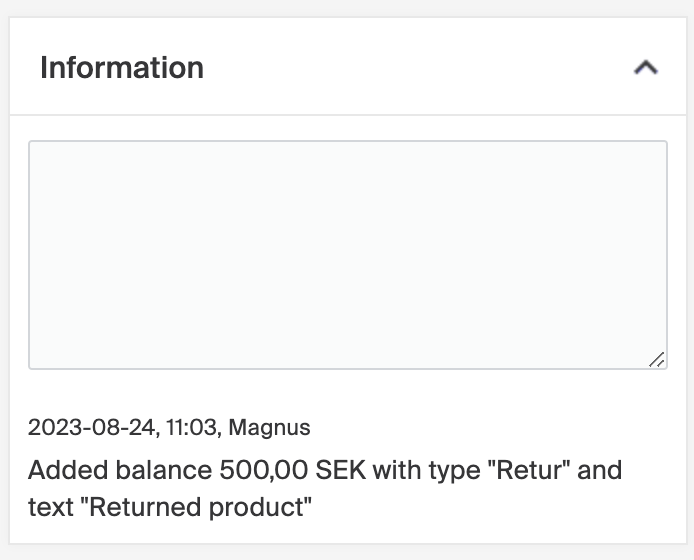
- Each balance entry is logged with a timestamp, who made it, and why
Quick guide
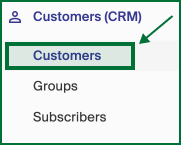
- Go to Customers (CRM) > Customers, or search for the customer.
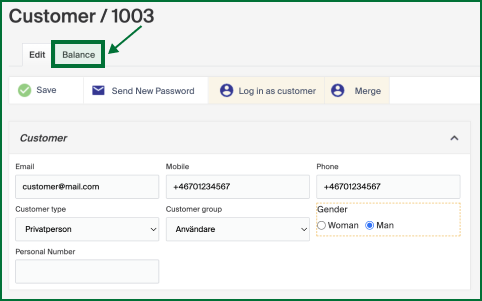
- Open the customer and click the Balance tab.
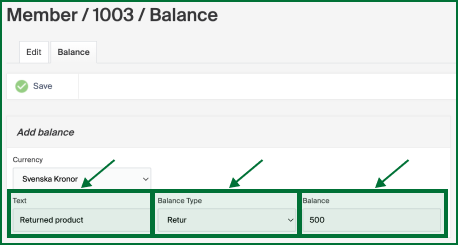
- Fill in Text, Balance type, and Balance.
- Click Save.
In Merchant Center, go to Customers (CRM) > Customers in the left menu, or search for the customer in the search bar.
Choose the customer you want to add funds to and click the Balance tab.
Fill in the following fields:
| Field | Description |
|---|---|
| Text | A reason for the refund, for internal purposes. |
| Balance type | The most common type is when a return is made. The options can vary depending on your initial setup. |
| Balance | The amount you want to credit to the customer's account. |
Click Save to make the balance appear on the customer's account.
Once saved, a log of the added balance appears in the Information box on the right, with a timestamp, who in your organization made the change, and why.
Place customer in customer group
Place customers in a customer group, either one at a time from the customer view or in bulk via the import tool.
Blacklist a customer
When a customer is set as blacklisted, purchases using that account or email address cannot be completed, and the email stays reserved by the blacklisted account.