Customer Management
How to remove a customer
If a customer asks to be removed from the system, use the Anonymize Customer function in the customer view in Merchant Center.
Key features
- Anonymize a customer to permanently remove their personal data
- The account remains for statistics, but all identifiable data is removed
- The action cannot be undone
Quick guide
- Find the customer via search or Customers (CRM) > Customers.
- On the customer view, click Anonymize user at the top right and confirm.
Anonymize a customer
Anonymizing a user permanently removes all personal data associated with that customer, including their name, email address, and any other identifiable information. This protects their privacy and ensures their data cannot be accessed or misused.
To remove a customer's data:
- Search for the customer's email address or name in the header search field, or go to Customers (CRM) > Customers.
- On the customer view, click Anonymize user at the top right and confirm.
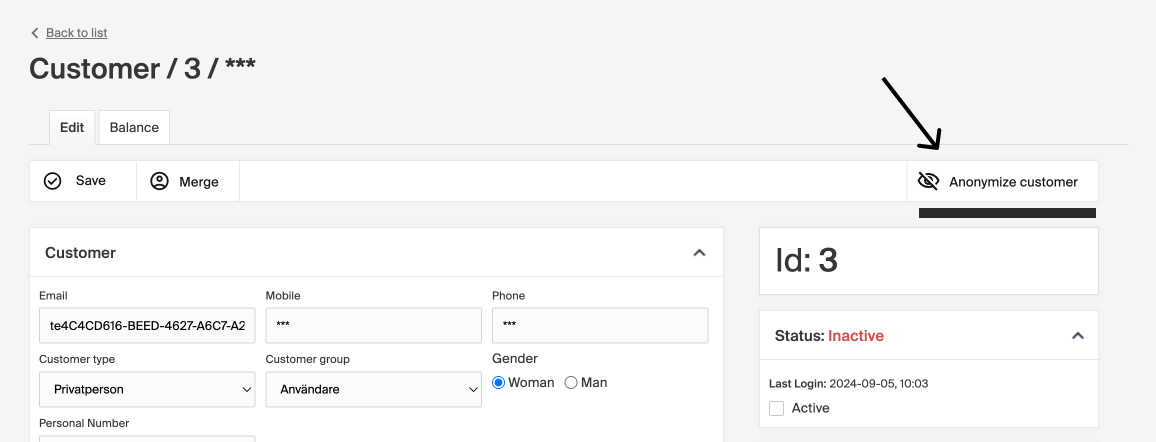
Once anonymized, the customer's personal data is irreversibly deleted. The account remains for statistics, but all customer data is permanently anonymized, so the customer can no longer log in. If they shop again with the same email address, a new account is created.
This action cannot be undone, so use the Anonymize user function with caution.