Widgets Library
Banner widget
The banner widget lets you create content with an image or video, text, and buttons.
Key features
- Combine an image or video with text and a button
- Set different media for desktop and mobile
- Link the banner to an internal or external URL
- Position text and button left, middle, or right
This widget sets up banners with links, text, media, and format recommendations.
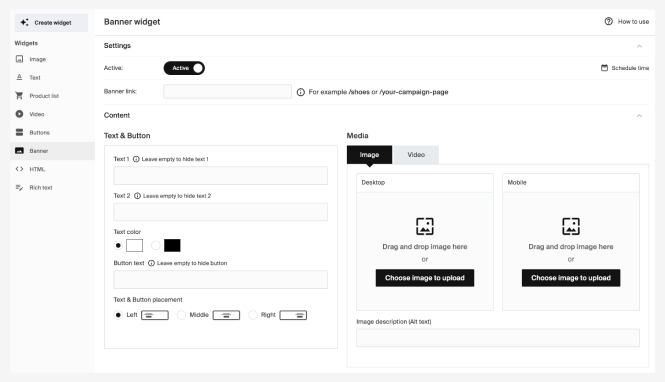
Settings
| Setting | Description |
|---|---|
| Banner Link | The URL the banner links to, for example /your-campaign-page. For internal links, use only the last part of the URL (e.g. /minicampaign for yourstore.se/minicampaign). |
Text & button
| Setting | Description |
|---|---|
| Text 1 | First row of banner text. Hidden if left empty. |
| Text 2 | Second row of banner text. Hidden if left empty. |
| Text Color | Black or white, for both texts. |
| Button Text | Call-to-action text. The button is hidden if empty. |
| Text & Button Placement | Position the text and button left, middle, or right. Placement depends on how it's implemented in your storefront. |
Media
You can combine video and images by device type (desktop or mobile). For video on both, save the Vimeo ID in both fields.
| Setting | Description |
|---|---|
| Image (Desktop) | Upload your desktop image first. This becomes the default. |
| Image (Mobile) | Upload a separate mobile image. If none is set, the desktop image displays on all devices. |
| Image Description (Alt Text) | A description for SEO and accessibility. |
| Desktop Video | Vimeo ID for desktop. Supports Vimeo Pro (or higher) accounts. |
| Mobile Video | Vimeo ID for mobile. |
Only Vimeo is supported for video backgrounds. For a placeholder while loading, upload an image in the Image tab. Keep videos short to optimize loading times.
Picture & video format
Use JPEG for best performance. GIFs are allowed but won't be optimized, so note the potential impact on page speed. Optimal image width depends on your site's design; height is dynamic. For best results, align images with columns of equal height.