Product monitoring
Key features
- Let end customers get an email when an out-of-stock product is restocked
- See active and total monitors in the products list, product view, and customer view
- Export a list of active monitors from the product view
Quick guide
- Make sure the store shows products with 0 inventory balance (required for monitoring).
- View monitors in the Active monitors / Total monitors columns, the product's Monitors box, or the customer's Monitors box.
- When stock is updated and published, active monitors are emailed automatically.
In Merchant Center
You can see product monitoring information in three places.
Products list
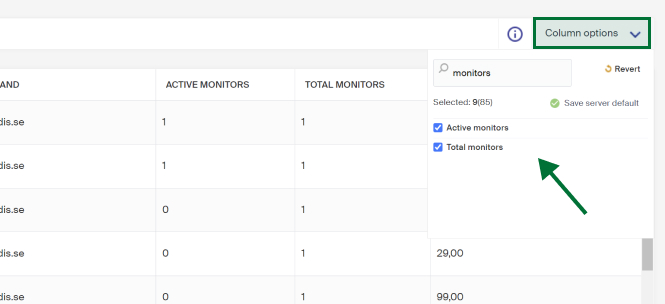
Two columns relate to monitoring: Active monitors and Total monitors. If you don't see them, enable them in the column options on the right of the list view.
- Active monitors , email addresses waiting to be notified when the product is back in stock (regardless of size level, if any).
- Total monitors , the total number of email addresses ever registered for monitoring on the product (regardless of sizes, if any).
Product view
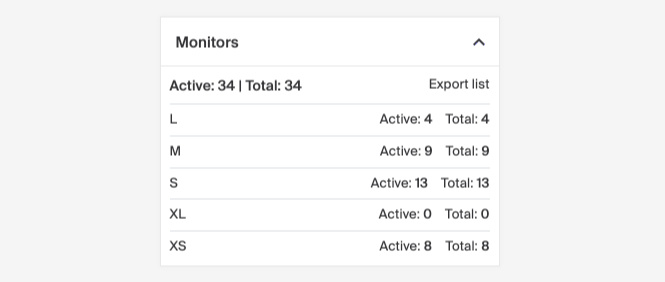
If a product has any monitors (active or previous), the information is in the Monitors box, showing active and total monitors at item level. You can also export a list of all active monitors here.
Customer view
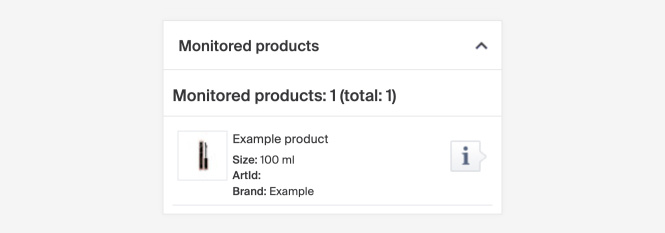
If an existing customer has active monitorings registered on their account, the information is in the Monitors box.
Automatic mail
When a product's inventory balance is updated in Merchant Center and published in the store, an automatic email is sent to the Active monitors. If 20 people monitor a product and 10 come back in stock, an email is still sent to all 20. Once emailed, they move from active monitors to total monitors.
- One email address can only exist once in total monitors.
- A monitoring email address doesn't need to be connected to a customer in the system.
- You can't see which size or type a monitoring applies to, only a total amount.
- Total monitors never reset to zero.
In the store
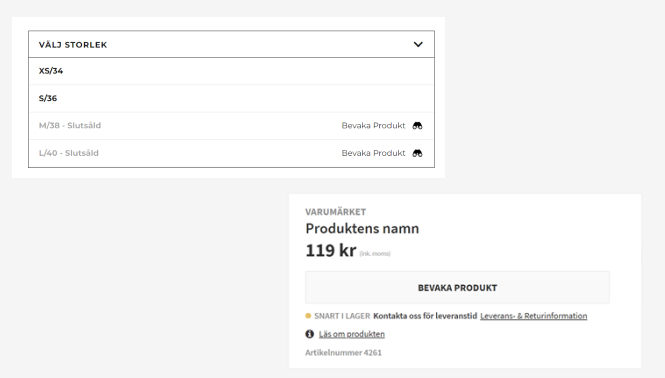
For example, on a product without sizes, the purchase button can be replaced with a monitoring button that opens a form for the customer's email address. If a product has sizes and one is out of stock, a monitoring link can be placed next to the size choice.
Configuration
The function requires the store to be configured so products with 0 inventory balance are shown. How it's used and looks depends on how the store is designed and built.