Product And Categories
Categories not showing up in the menu
If categories aren´t showing in the menu you built, there are a few different things that can affect that.
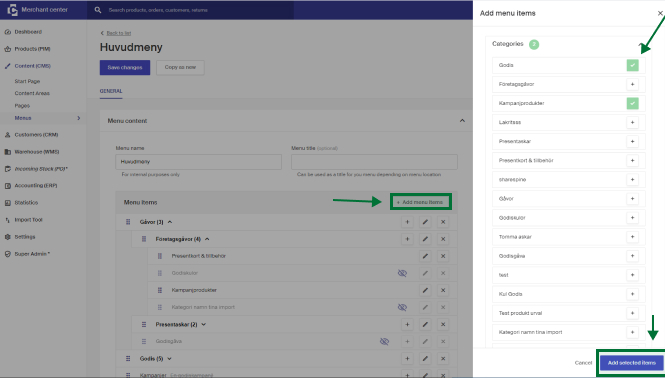
- Category is inactive or is missing active products. If the category is added in the menu, you can see if it's not shown in the store by an icon with a crossed-out eye on the category.
- Category is set as hidden.
- The category isn't added in the menu.
For a category to be visible in the menu it needs to be added in the menu. To do this:
- Go into the current menu under Content (CMS) > Menus.
- Click +Add menu Items (or the + sign if you want to add a sub-category on an existing list).
- Choose the category or categories you want to place out and click Add selected items.
- Ensure the categories are in their wished place, then click Save Changes up to the left to publish it live in your store.
Can I publish a product that has 0 as price?
By default, products with a price set to 0 won't be published via Merchant Center. However, this setting can be configured if needed.
Can I export a list of active monitors on a product?
Yes, you can. If a product has active monitors, the **Monitors** box will appear on the product page in Merchant Center. Click **Export List** to download a list of all active monitors for that product.