Apply / update product parameter values via the import tool
Key features
- Update product parameter values in batch with the import tool
- Use the ready-made product parameters import template
- Match values to existing values for picker and multipicker parameters
Quick guide
- Go to Import Tool > New.
- Choose your file, set the File Extension, and choose template type Product Parameters.
- Match the columns and click Start import.
In Merchant Center, go to Import Tool > New. If you have a file ready, click Select file and choose it. Set the file type in the File Extension dropdown and click Next.
Use the import template for product parameters
To work with the product parameters import template, first download it: in the Template Type dropdown, choose Product parameters, then click Download template file.
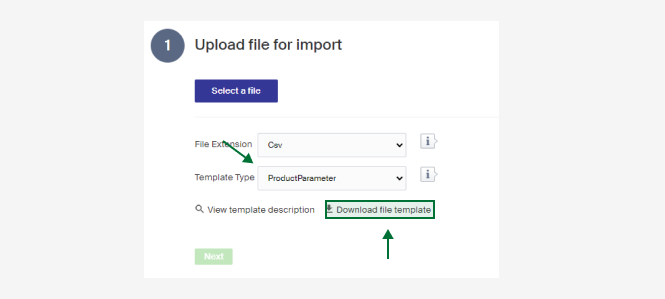
The columns are described below. There's also a short description in Merchant Center under View template description.
| Column | Description |
|---|---|
| ProductId | ID of the product the parameters should be imported to. |
| ProductName | The product's name. Mandatory if the ID isn't filled. Can be left empty if the ID exists. |
| ParameterGroup | The name of the parameter group, set in the Group Name field on a parameter group. |
| ParameterName | The name of the parameter, the Name field on a parameter. |
| Value | The value you want the product to have for its parameter. Must be matched to existing values if it's a picker or multipicker type. |
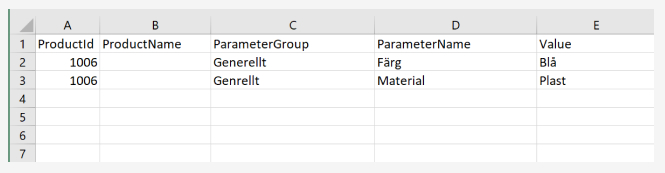
Example of a filled import file:
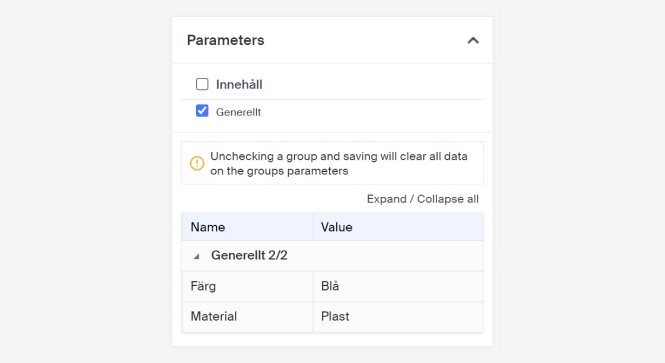
This is how it looks inside the product after a successful import:
When your file is done
- Click Import Tool in the menu, then click New to make a new import.
- Choose the file you want to import.
- Choose the file type in the File Extension dropdown.
- Choose template type Product Parameters.
- Click Next, then make sure the columns described above are mapped to the system's columns.
- Click Start import.
When the import is done, the products' parameters and parameter values are updated.
Create parameters and parameter groups
How to create parameters and parameter groups that need to be in place to give products different characteristics and filtering attributes.
Create customer group
Create a customer group to give a percentage discount on the whole assortment to a selected set of customers.