Customer Groups
Create customer group
Create a customer group to give a percentage discount on the whole assortment to a selected set of customers.
Key features
- Give a percentage discount on the entire assortment to a selected set of customers
- Customers must be logged in to see and get the discounted prices
- Read in price lists for different customer groups
- Create customer group specific content, such as start pages, in the CMS
Quick guide
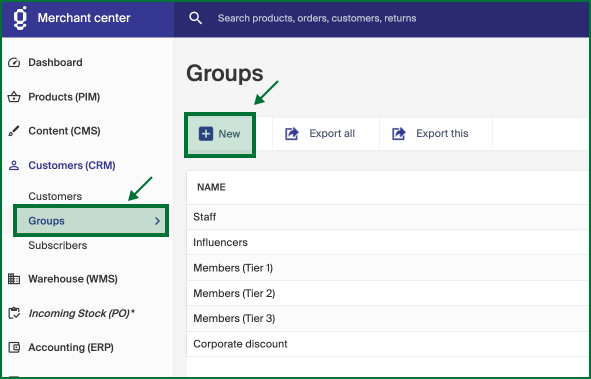
- Go to Customers (CRM) > Groups > New.
- Enter a Name for the group.
- Set the Discount % for the group.
- Click Save.
In Merchant Center, go to Customers (CRM) > Groups > New.
Settings
| Field | Description |
|---|---|
| Name | The group name. It is shown in Merchant Center when you choose a customer group on a customer. |
| Discount | The discount percentage applied to the whole assortment. For example, 20 gives customers in the group a 20% discount on all orders placed while logged in to the store. |
Click Save to create the customer group.
Once the group is created, you can place customers in it, either from the customer view under Customers or via the import tool. See Place customer in customer group.