Working with translations
Key features
- Translate products, categories, and brands on their Translate tab
- Update translations in bulk with the import tool (products and categories)
- Translate campaign titles and landing page fields, depending on campaign type
If your webshop supports multiple languages, you can manage translations in Merchant Center in a few ways: translate specific pages such as products, categories, or brands, or use the import tool to update translations in bulk.
Translating products, categories, and brands
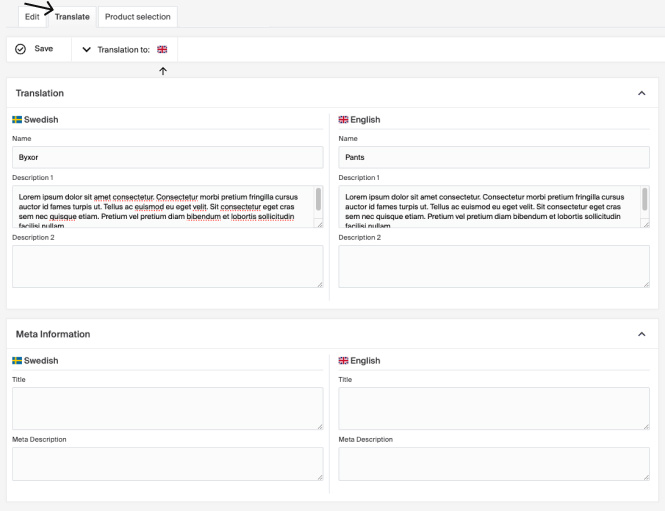
Each product, category, or brand has a Translate tab to manage text translations.
- Go to the Translate tab. The default-language text appears on the left and fields for the selected language on the right.
- Use the Translation to dropdown to choose your target language.
- Edit the fields and click Save.
Basic text fields and meta information can be translated for products, categories, and brands. For products, additional free-text fields (parameter type: Text) are also eligible.
Bulk translations via the import tool
Bulk translation updates via the import tool are available for products and categories.
For categories: prepare a file with the columns Name, LanguageId, and the text fields you wish to translate (for example Name, Description, MetaTitle, MetaDescription). Go to Import Tool > New, upload your file, choose Category as the template type, map the columns, and start the import.
For products: prepare a file with the columns Name, Language, and text fields (Text1, Text2, Text3). Go to Import Tool > New, upload your file, select Product as the template, choose Insert/Update, map the columns, and start the import.
Campaign translations
The ability to translate campaigns varies by type:
| Campaign type | Translatable fields |
|---|---|
| Promo Codes | No translatable fields. |
| Cart-based Campaigns | The campaign title. Use the language selector (flag icon) next to the title. |
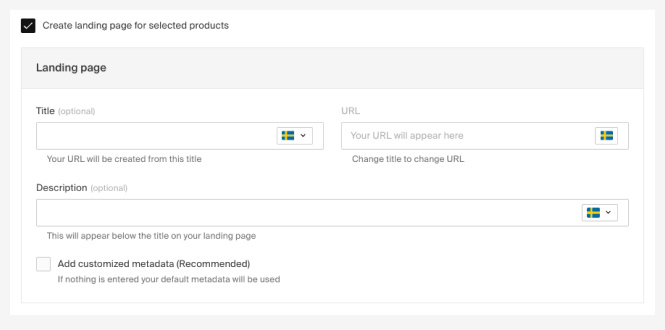
| Product Price Campaigns | The campaign title and, if a landing page is created, the title, description, and meta fields. |
Menus
Menus can include predefined items (like category names) and custom links with text added directly in the menu, so translation methods vary by item type.
A detailed article on menu translations will be available soon.
How to edit product texts in other languages
If you support multiple languages, update product texts directly on the product page or in bulk using the import tool.
Will multiple cart-based campaigns apply based on priority if they target different products?
If the campaigns apply to different products, both will be applied.