Texts And Content
Creating language specific CMS content
In Geins CMS, you can publish content based on the language your storefront uses, such as different start pages for each language.
Key features
- Publish content based on the storefront language
- Set language filters on start pages, content areas, and pages
- Apply a language filter to menus
Start pages, content areas, and pages
You can set language filters in the Filter settings for these content types. For example, a start page can be set to display only when the storefront is in Swedish.
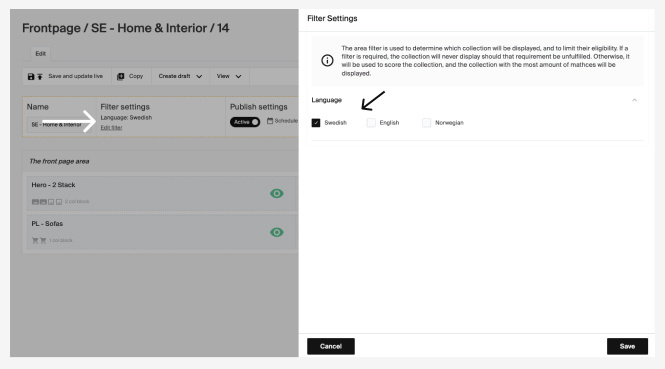
The available filters depend on your storefront's configuration. If the language filter isn't implemented, it won't appear in the options.
Menus
You can apply the same language filter to menus. The language option is in the Display Settings on the right.
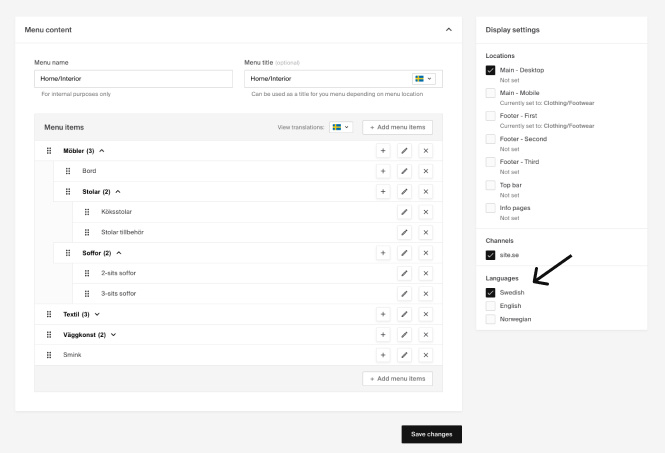
Languages and translations on a menu
- The view translations select lets you see what the menu will look like and include for each language.
- Menus can include both items with predefined values, such as a category name or brand, and custom links with text added directly in the menu, so how menu items are translated will differ.
An extended article on menus and translations will be available shortly.
Multilingual and multi-currency support on campaigns
If you support multiple languages and currencies, you can configure campaigns for all your currencies within the same campaign creation view.
How to edit product texts in other languages
If you support multiple languages, update product texts directly on the product page or in bulk using the import tool.