General Settings For Content Management
List views in the CMS
The CMS list views show the content you created, with features that make it easier to manage.
Key features
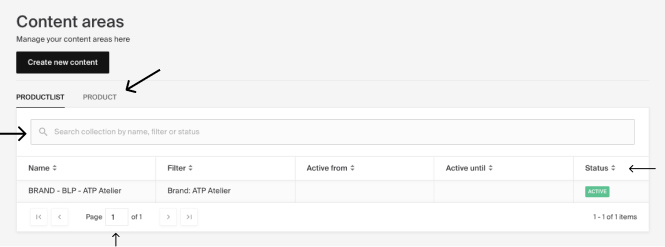
- Quick search to find content by name, filters, or status
- A status column showing whether content is existing, active, inactive, or a draft
- Tabs for content areas, one per area above the list, to toggle between the content created for each
The CMS list views show the content you created, with a layout that makes it easier to manage.
| Feature | Description |
|---|---|
| Quick search | Find content in the lists easily. Search by name, filters, or status. |
| Status column | Shows the status: existing, active, inactive, or draft. |
| Tabs for content areas | On the content areas page, one tab per content area appears above the list. Toggle between them to view the content created for each area. |