How can I create a promo code valid to all members?
Using Once per customer
Check the Once per customer option under settings. This allows all logged-in customers to use the promo code once. Make sure this is the only limit use setting checked to ensure it applies to all eligible customers.

Group exclusive campaign
If you want to allow several purchases with the same code per logged in customer, you can achieve this with "Group exclusive campaign" and check the member groups that are relevant. Note - this requires that the customers are placed in a customer group.
A customer can only be placed in one customer group. So if all groups are added, all customers that are placed in a group should be able to use the code.
When a customer becomes a member either if they created the account themself or if they were added after their first order, default is that they are assigned to your set default customer group. Exceptions to this can occur if your implementation is configured in a different way.
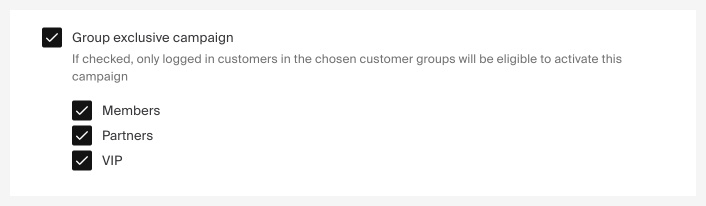
The customer groups (except the default group ) available are the ones created by your organisation. Here you can read more on how to create customer groups
Difference between a product price campaign based on regular price or discount price
When creating a product price campaign, it can be challenging to comprehend its behavior when dealing with products that are already discounted. This article aims to elucidate the differences in order to provide clarity.
In campaign performance, is the campaign margin calculated before or after discounts on the products?
The campaign margin is calculated based on the **selling price**, meaning the price the products had within the campaign after discounts were applied.